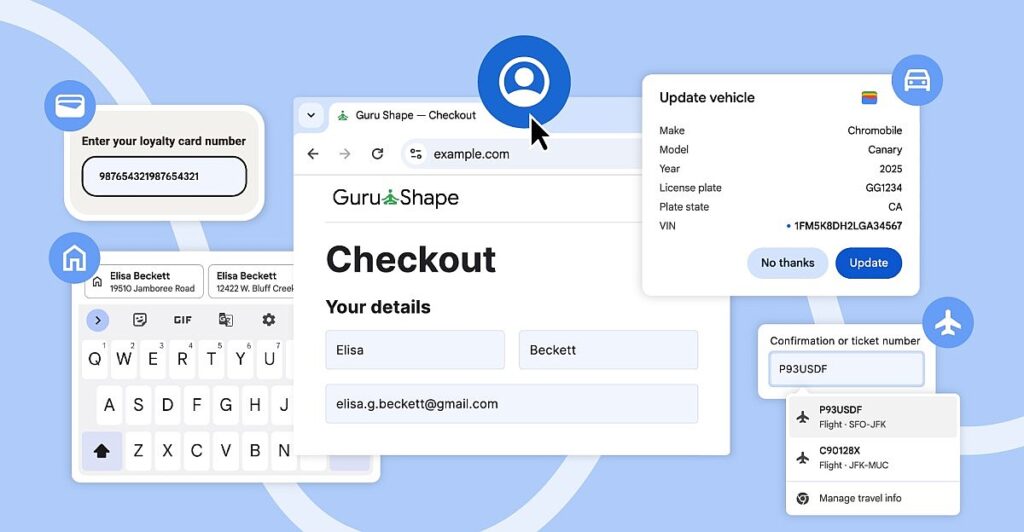
Chrome can now autofill details from your Google account
Google has recently unveiled a series of significant enhancements to the autofill feature in Chrome, aimed at streamlining the user experience across both mobile and desktop platforms. This update allows autofill to access a wider array of user data stored in Google Wallet, making it easier than ever to fill out forms with accuracy and efficiency. Now, when users are logged into their Google Accounts on Chrome—whether on desktop, iOS, or Android—they can seamlessly autofill their name, email address, and both work and home addresses. This not only saves time but also reduces the likelihood of errors when entering personal information into various online forms.
One of the noteworthy improvements for Chrome on Android is the expansion of autofill suggestions that appear above the on-screen keyboard. The suggestions will now feature a more spacious layout, displaying two lines of relevant information. This enhancement is particularly useful when users are faced with multiple contacts sharing the same name, as it provides additional context to help them select the correct entry. Furthermore, Google is addressing the complexities of international addresses, with specific improvements for Mexican addresses that often include cross-street references. Additionally, support for phonetic names in Japan is on the horizon, which will further enhance the autofill experience for users in those regions.
In the previous month, Chrome introduced a groundbreaking feature allowing users to autofill critical details such as passport numbers, driver’s licenses, and vehicle information, including VINs and license plates, for those who opted into the “enhanced autofill” setting. This feature, available on both desktop and Android versions, will now also utilize data from travel bookings saved in Google Wallet. For example, when renting a car online, users can conveniently autofill their arrival details based on their flight information, making the booking process smoother and more efficient. These updates reflect Google’s ongoing commitment to enhancing user convenience and security, ensuring that autofill not only saves time but also provides a more personalized and context-aware experience.
Google has
announced several autofill improvements
being rolled out to the mobile and desktop versions of Chrome. The updates will give autofill access to more of your data from places like Google Wallet and make it easier to select the right info a form is asking for when there are multiple suggestions.
Autofill can now access your name, email address, and saved work and home addresses from your Google Account while you’re signed into the desktop, iOS, and Android versions of Chrome.
For Chrome on Android, Google is expanding the autofill suggestions that appear above the onscreen keyboard so they’re not as condensed and easier to differentiate. The suggestions will now display two lines of information that could, for example, include the addresses of two contacts with the same name so you have more context for choosing the correct one.
Google is also improving how Chrome’s autofill completes forms with international addresses, including Mexican descriptions that often reference two cross-streets, while support for “phonetic names in Japan” will be introduced later.
Last month
Chrome added the ability
to
autofill details like your passport number
, driver’s license, loyalty cards, and info about your vehicle including its VIN and license plate for desktop users who turned on “
enhanced autofill
.” Both the desktop and Android versions of Chrome will now be able to access data from travel bookings saved in Google Wallet, so if you’re booking an airport rental car online, you can autofill details like the time and day your flight arrives.


