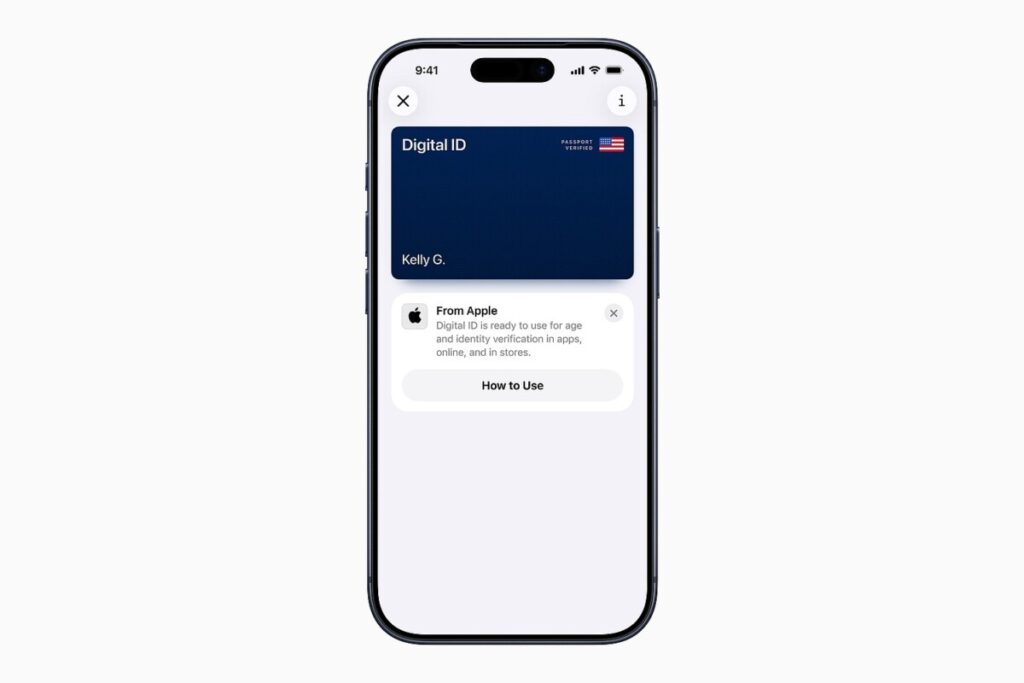
Apple launches Digital ID using your passport
Apple has officially launched its Digital ID feature, allowing users to securely digitize their U.S. passport information and store it in the Wallet app on their iPhones. This innovative feature, available starting Wednesday, marks a significant expansion of Apple’s digital identification capabilities, which previously included the ability to store driver’s licenses and other identity cards for residents of 12 states and Puerto Rico. With the new Digital ID, travelers can now use their iPhones to pass through Transportation Security Administration (TSA) checkpoints at over 250 airports nationwide, streamlining the security process and enhancing the travel experience.
To utilize the Digital ID, users simply need to ensure their iPhone is updated to iOS 26.1. They can then open the Wallet app, tap the “+” icon, and follow the prompts to add their U.S. passport. After completing a few verification steps, the Digital ID will be securely stored on the device, encrypted to ensure privacy. When it comes time to clear security, travelers can present their Digital ID by tapping their iPhone at the TSA checkpoint and confirming their identity using Face ID or Touch ID. This feature not only simplifies the security process but also satisfies the Real ID requirement, ensuring compliance with federal identification standards.
While it’s important to note that the Digital ID does not replace the physical passport for international travel or legal requirements, Apple has ambitious plans for its future applications. According to Jennifer Bailey, Apple’s vice president of Apple Pay and Apple Wallet, the company envisions a broader use for Digital ID, including functionalities like rental car access, hotel check-ins, and age verification at bars. The goal is to create a standardized digital identity solution that could one day facilitate border crossings and other identity verification needs. As Apple continues to innovate in this space, the Digital ID feature promises to revolutionize how we manage and present our identification in various aspects of life, making travel and everyday transactions more seamless and secure.
https://www.youtube.com/watch?v=iInlDMtXsBQ
You can now digitize your passport thanks to Apple’s latest feature, Digital ID, launching on Wednesday.
Digital ID allows you to securely store your passport information in your iPhone’s wallet. You can then use your Digital ID at more than 250 airports nationwide as a form of identification to pass through Transportation Security Administration checkpoints.
This represents a major expansion of Apple’s digital identification efforts. Prior to this, 12 states and Puerto Rico had already supported the ability to
add a driver’s license and other identity cards
to an Apple Wallet.
With Digital ID, anyone who has a U.S. passport can store that information directly into their iPhone. You can also share the Digital ID with a paired Apple Watch.
APPLE
When it’s time to clear security, you simply tap your iPhone at the TSA checkpoint and perform a face or touch ID scan on your phone to get verified. You can keep your physical ID in your wallet.
Even better, because you’ve essentially presented a digitalized version of your passport, you’ll satisfy the
Real ID requirement
as well.
Now, before you get too excited, note that this isn’t a passport replacement — at least not yet.
You still need to present a passport at immigration and wherever else they’re required by law. At launch, Digital ID’s primary use case is to facilitate seamless passage through TSA checkpoints.
But Apple has several additional use cases in the pipeline, Jennifer Bailey, Apple’s vice president of Apple Pay and Apple Wallet, told me in an exclusive interview.
From rental cars to hotel keys to age verification at a bar, Apple’s efforts to turn Digital ID into a replacement for your physical identity card are just beginning.
“Our goal is [to]… create a standard that can be adopted by us and all of the other ecosystem partners that you will be able to do border crossings with Digital ID in the future,” she said.
To create your Digital ID, ensure your iPhone is updated to iOS 26.1. Then, open the Wallet app, tap the button with the “+” icon and scroll to ID Cards. Follow the steps to add your U.S. passport, and after completing a few simple verification steps, your Digital ID will be saved to your device.
Note that your Digital ID data is encrypted, and your passport data will be stored exclusively on your device. Apple can’t see when and where you present your ID or what data was presented.
Related reading:
TPG’s 2025 travel trends report
Key travel tips you need to know — whether you’re a beginner or expert traveler
The best travel credit cards
Where to go in 2024: The 16 best places to travel
6 real-life strategies you can use when your flight is canceled or delayed
8 of the best credit cards for general travel purchases
13 must-have items the TPG team can’t travel without
Editorial disclaimer: Opinions expressed here are the author’s alone, not those of any bank, credit card issuer, airline or hotel chain, and have not been reviewed, approved or otherwise endorsed by any of these entities.